Best Laptops For Coding
Whether you’re a computer science student, a professional software developer, or someone learning programming for the first time, choosing the right laptop can significantly improve your productivity. Modern programming requires more than just a fast processor. Developers often run IDEs, virtual machines, Docker containers, Android Studio, browsers with multiple tabs, databases, and testing tools simultaneously. A laptop with the right balance of performance, battery life, display quality, and portability makes coding more comfortable and efficient.
Fortunately, the Indian laptop market offers several excellent options that are well-suited for coding and software development. In this guide, we’ve selected the best laptops for programming based on their performance, display quality, keyboard comfort, battery life, and overall value.
Quick Specifications Comparison
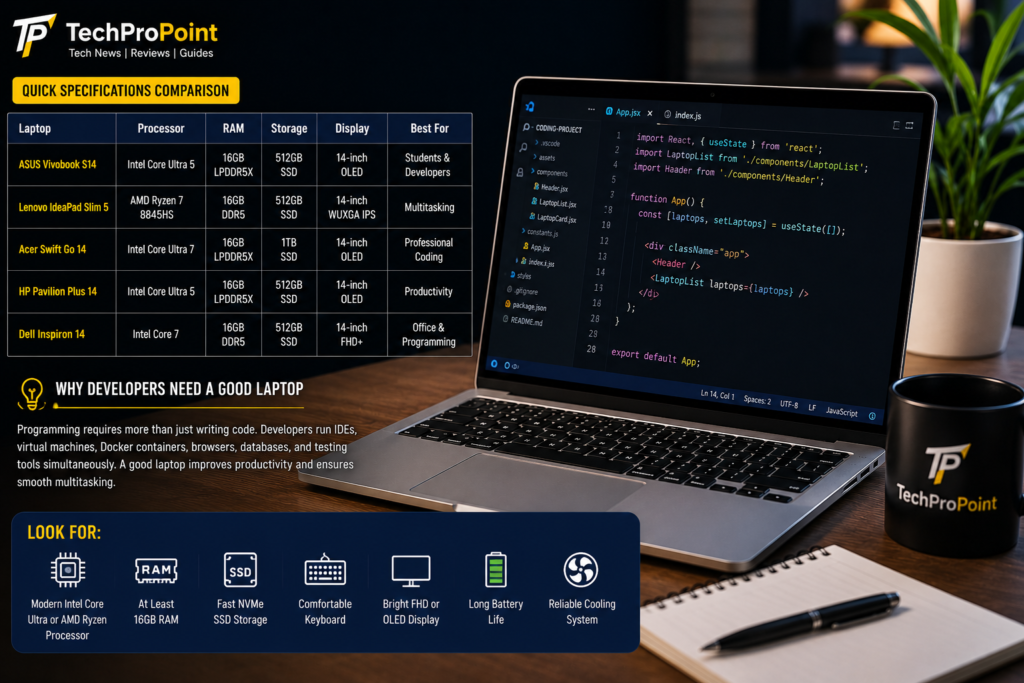
| Laptop | Processor | RAM | Storage | Display | Best For |
|---|---|---|---|---|---|
| ASUS Vivobook S14 | Intel Core Ultra 5 | 16GB LPDDR5X | 512GB SSD | 14-inch OLED | Students & Developers |
| Lenovo IdeaPad Slim 5 | AMD Ryzen 7 8845HS | 16GB DDR5 | 512GB SSD | 14-inch WUXGA IPS | Multitasking |
| Acer Swift Go 14 | Intel Core Ultra 7 | 16GB LPDDR5X | 1TB SSD | 14-inch OLED | Professional Coding |
| HP Pavilion Plus 14 | Intel Core Ultra 5 | 16GB LPDDR5X | 512GB SSD | 14-inch OLED | Productivity |
| Dell Inspiron 14 | Intel Core 7 | 16GB DDR5 | 512GB SSD | 14-inch FHD+ | Office & Program |
Best Laptops For Coding
Why Developers Need a Good Laptop
Programming is no long limited to writing simple code. Today’s developers often work with multiple applications simultaneously, including code editors, browsers, databases, cloud services, and virtual environments. A capable laptop not only speeds up compilation and testing but also provides a smoother multitasking experience.
When buying a laptop for coding, look for:
- A modern Intel Core Ultra or AMD Ryzen processor
- At least 16GB RAM
- Fast NVMe SSD storage
- Comfortable keyboard
- Bright Full HD or OLED display
- Long battery life
- Reliable cooling system
These features help developers work efficiently without unnecessary slowdowns.
Best Laptops For Coding
1. ASUS Vivobook S14
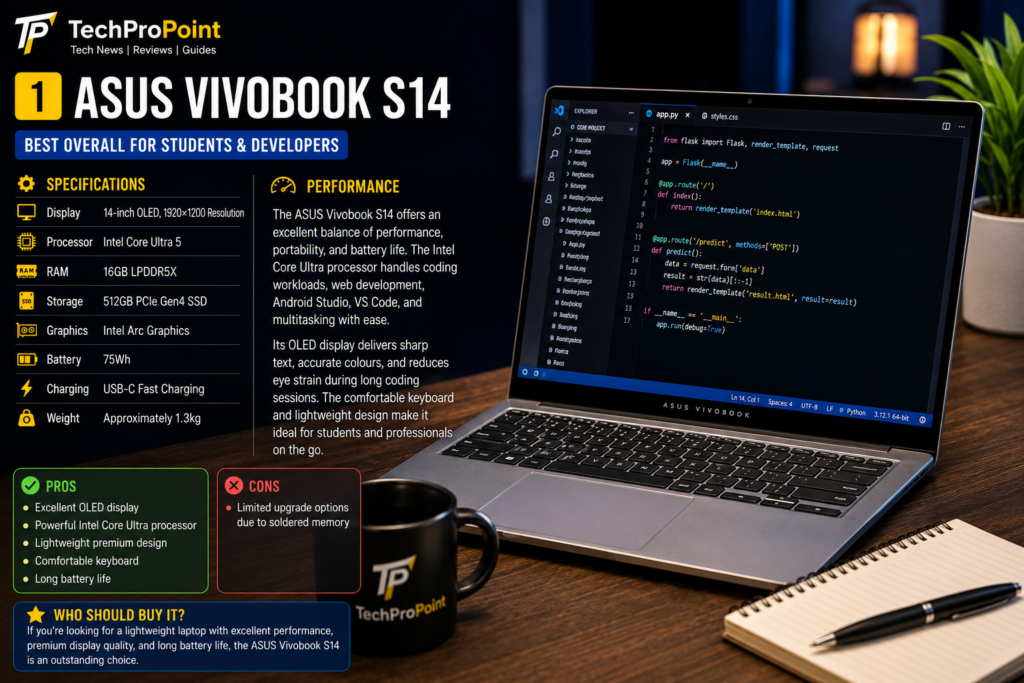
Specifications
- Display: 14-inch OLED, 1920×1200 Resolution
- Processor: Intel Core Ultra 5
- RAM: 16GB LPDDR5X
- Storage: 512GB PCIe Gen4 SSD
- Graphics: Intel Arc Graphics
- Battery: 75Wh
- Charging: USB-C Fast Charging
- Weight: Approximately 1.3kg
Best Laptops For Coding
Performance
The ASUS Vivobook S14 is one of the best laptops for programming thanks to its excellent balance of performance, portability, and battery life. The Intel Core Ultra processor handles coding workloads, web development, Android Studio, Visual Studio Code, and multitasking with ease.
Its OLED display delivers sharp text, accurate colours, and reduced eye strain during long coding sessions. The comfortable keyboard makes typing code for hours much easier, while the lightweight design makes it ideal for students and professionals who travel frequently.
Who Should Buy It?
If you’re looking for a lightweight laptop with excellent performance, premium display quality, and long battery life, the ASUS Vivobook S14 is an outstanding choice.
Pros
- Excellent OLED display
- Powerful Intel Core Ultra processor
- Lightweight premium design
- Comfortable keyboard
- Long battery life
Cons
- Limited upgrade options due to soldered memory
Best Laptops For Coding
2. Lenovo IdeaPad Slim 5
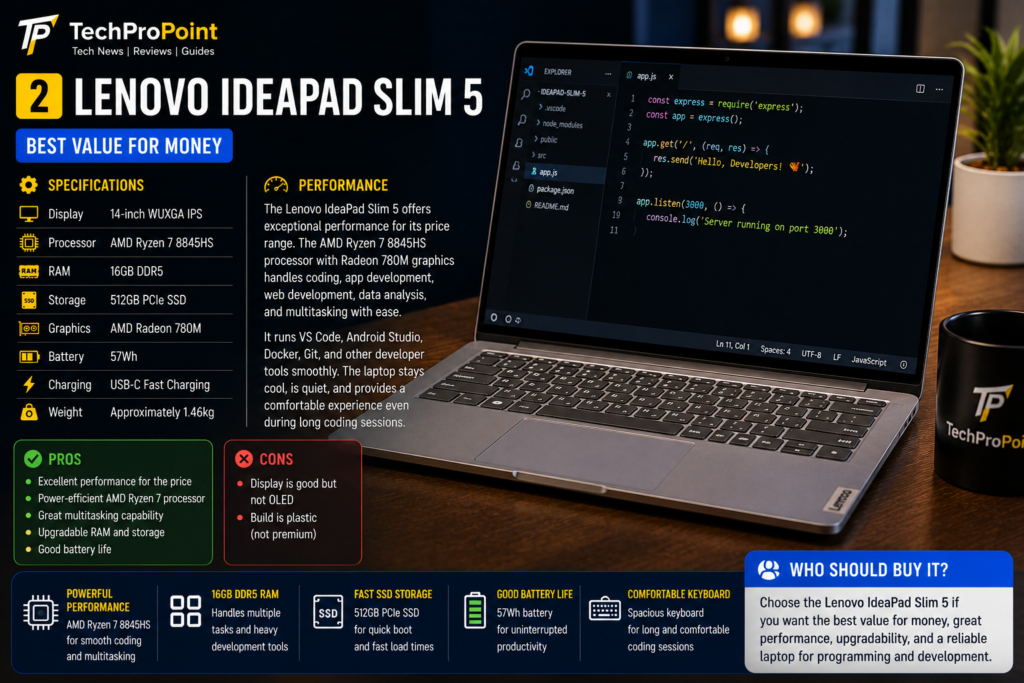
Specifications
- Display: 14-inch WUXGA IPS Display
- Processor: AMD Ryzen 7 8845HS
- RAM: 16GB DDR5
- Storage: 512GB SSD
- Graphics: AMD Radeon Graphics
- Battery: 57Wh
- Charging: Rapid Charge Support
Performance
The Lenovo IdeaPad Slim 5 offers impressive performance for programmers who regularly compile projects, run multiple development tools, and multitask throughout the day. Its Ryzen processor provides strong multi-core performance, making it suitable for coding, virtualization, and software development.
The laptop remains cool during long coding sessions, and the keyboard offers a comfortable typing experience with well-spaced keys. Combined with a bright display and dependable battery backup, it is an excellent productivity machine.
Who Should Buy It?
Developers looking for a balance between performance, portability, and affordability will appreciate the Lenovo IdeaPad Slim 5.
Pros
- Powerful Ryzen processor
- Excellent multitasking performance
- Comfortable keyboard
- Good battery life
Cons
- IPS display is good but lacks OLED-level contrast
3. Acer Swift Go 14
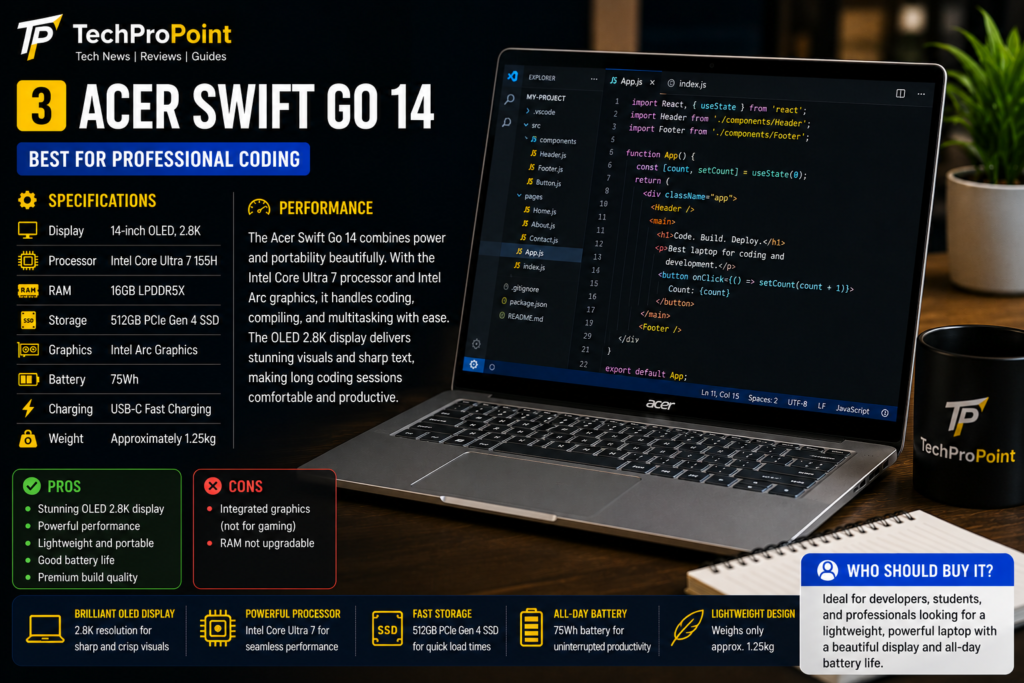
Specifications
- Display: 14-inch OLED Display
- Processor: Intel Core Ultra 7
- RAM: 16GB LPDDR5X
- Storage: 1TB PCIe SSD
- Graphics: Intel Arc Graphics
- Battery: 65Wh
- Charging: USB-C Fast Charging
Performance
The Acer Swift Go 14 is designed for developers who need both performance and portability. The Intel Core Ultra 7 processor handles demanding programming tasks, virtualization, cloud development, and AI-based workflows with ease.
Its vibrant OLED display provides excellent clarity, making it easier to read code for extended periods. The large SSD offers enough storage for development tools, programming projects, virtual machines, and multimedia files without worrying about running out of space.
Who Should Buy It?
If you’re a professional developer or computer science student who wants a premium coding laptop with strong performance and a stunning display, the Acer Swift Go 14 is one of the best choices available.
Pros
- Outstanding OLED display
- Excellent coding performance
- Large 1TB SSD
- Premium lightweight design
Cons
- Premium pricing compared to entry-level alternatives
4. HP Pavilion Plus 14
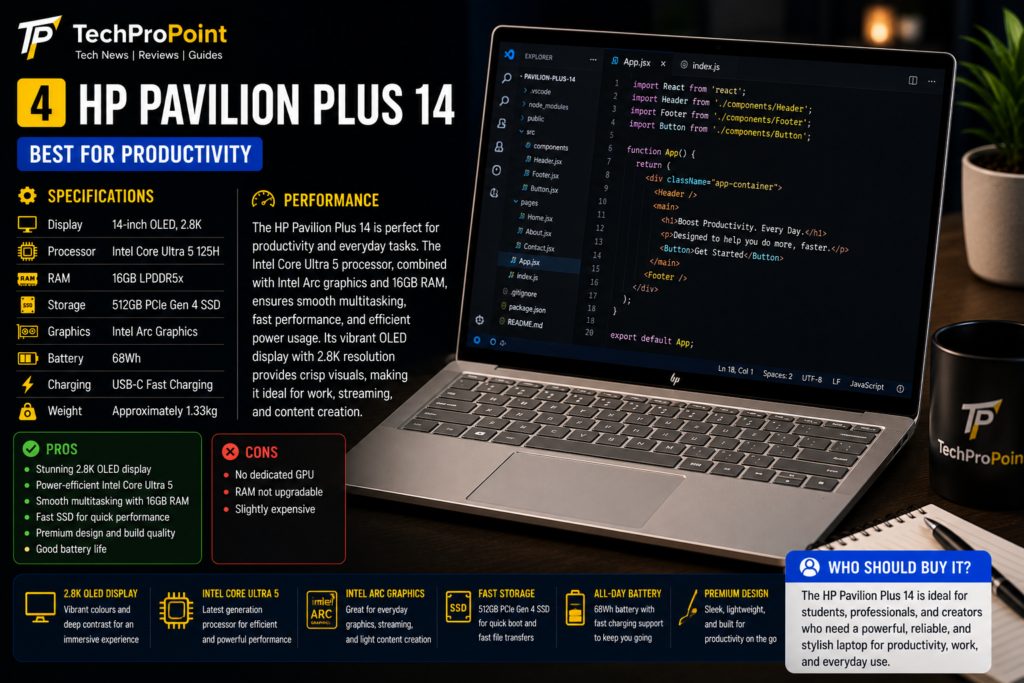
Specifications
- Display: 14-inch OLED, 2.8K Resolution
- Processor: Intel Core Ultra 5
- RAM: 16GB LPDDR5X
- Storage: 512GB PCIe Gen4 SSD
- Graphics: Intel Arc Graphics
- Battery: 68Wh
- Charging: USB-C Fast Charging
- Weight: Approximately 1.4kg
Performance
The HP Pavilion Plus 14 is designed for users who want premium performance in a compact laptop. Its Intel Core Ultra processor delivers excellent speed for programming, web development, Python, Java, Android Studio, and other software development tools.
The sharp OLED display makes reading code easier and provides vibrant colours for UI and graphic design work. The laptop also offers a comfortable keyboard and responsive touchpad, making long coding sessions more enjoyable.
Who Should Buy It?
If you need a premium laptop with a beautiful display, solid battery life, and dependable performance for programming, the HP Pavilion Plus 14 is an excellent option.
Pros
- Premium OLED display
- Powerful Intel Core Ultra processor
- Comfortable keyboard
- Lightweight and stylish design
Cons
- RAM is not user-upgradable
5. Dell Inspiron 14
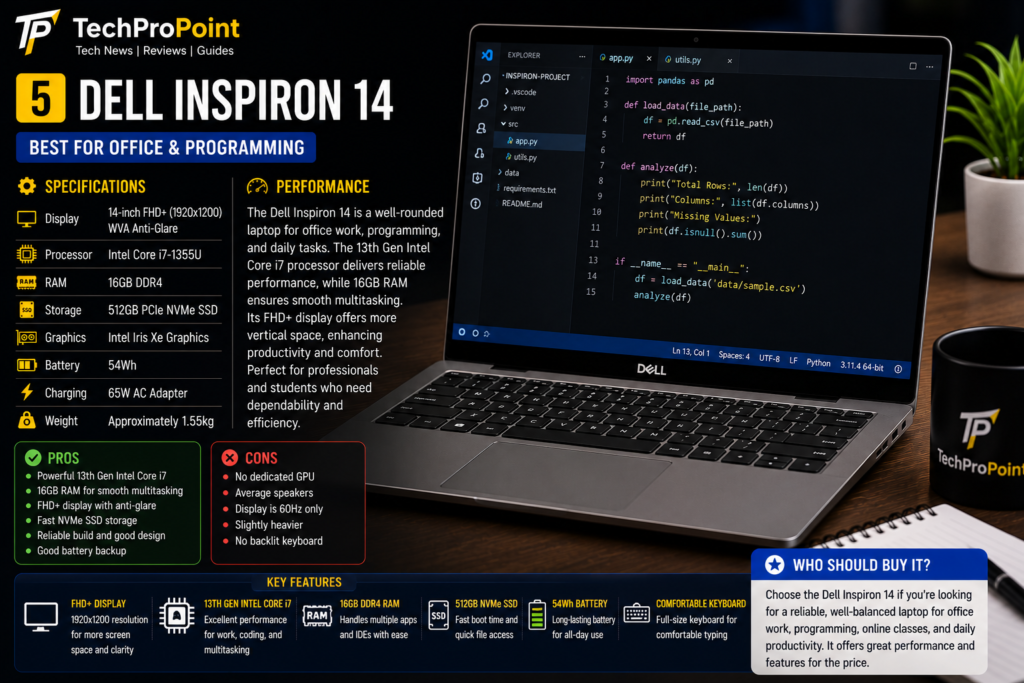
Specifications
- Display: 14-inch Full HD+ IPS Display
- Processor: Intel Core 7
- RAM: 16GB DDR5
- Storage: 512GB PCIe SSD
- Graphics: Intel Integrated Graphics
- Battery: 54Wh
- Charging: USB-C Fast Charging
- Weight: Approximately 1.5kg
Performance
The Dell Inspiron 14 is a dependable laptop for developers who value stability and reliability. It performs smoothly with Visual Studio Code, IntelliJ IDEA, Eclipse, Android Studio, Git, Docker, and various programming environments.
Dell’s durable build quality, efficient cooling system, and comfortable keyboard make this laptop suitable for students, office professionals, and software developers alike.
Who Should Buy It?
Choose the Dell Inspiron 14 if you want a reliable laptop with dependable performance, good build quality, and excellent everyday usability.
Pros
- Reliable performance
- Comfortable keyboard
- Durable build quality
- Good multitasking capability
Cons
- Display quality is good but not as vibrant as OLED panels
Laptop Comparison
Best Laptops For Coding
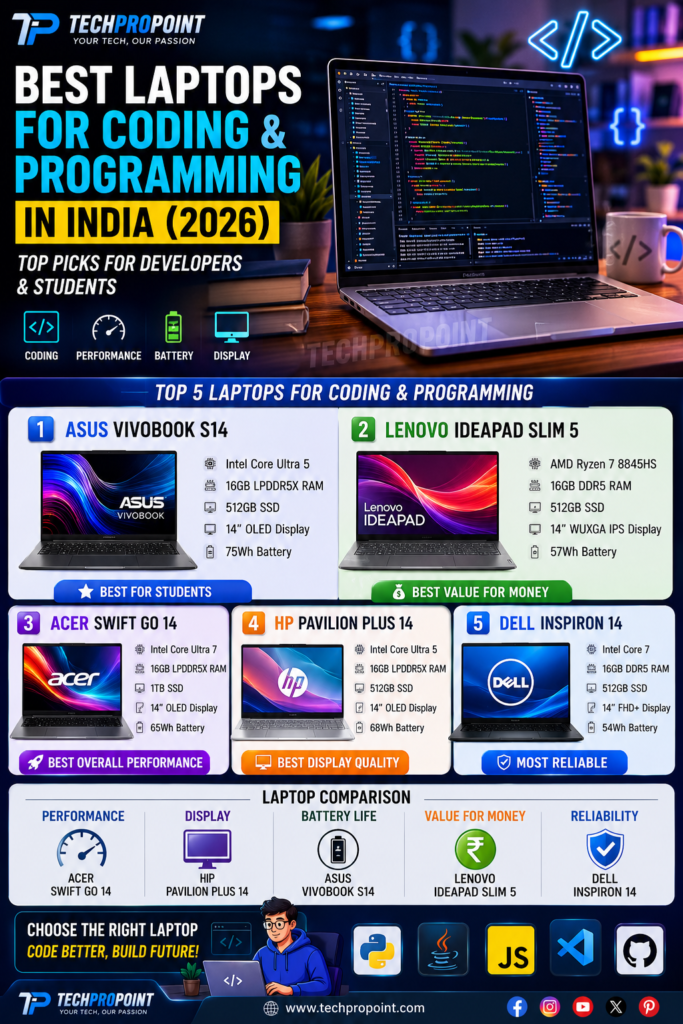
| Feature | Winner |
|---|---|
| Best Overall Laptop | Acer Swift Go 14 |
| Best Value for Money | Lenovo IdeaPad Slim 5 |
| Best Display | HP Pavilion Plus 14 |
| Best Battery Life | ASUS Vivobook S14 |
| Best Professional Laptop | Acer Swift Go 14 |
| Best Student Laptop | Lenovo IdeaPad Slim 5 |
Best Laptops For Coding
Which Laptop Should You Buy?
Choose ASUS Vivobook S14 if:
- You need excellent battery life.
- You travel frequently.
- You want a lightweight coding laptop.
Choose Lenovo IdeaPad Slim 5 if:
- You want the best value for money.
- You perform heavy multitasking.
- You are a college student learning programming.
Choose Acer Swift Go 14 if:
- You need maximum performance.
- You work with AI tools, virtualization, or large development projects.
- You want a premium OLED display.
Choose HP Pavilion Plus 14 if:
- You prefer a premium design.
- You spend long hours coding.
- Display quality is your priority.
Choose Dell Inspiron 14 if:
- You need a dependable laptop for office work and programming.
- You value durability and reliability.
- You want a balanced everyday machine.
Best Laptops For Coding
Final Verdict
Programming requires a laptop that can deliver consistent performance, fast multitasking, comfortable typing, and dependable battery life. Every laptop featured in this guide is capable of handling coding tasks efficiently, whether you are learning your first programming language or developing professional software.
If overall performance is your priority, the Acer Swift Go 14 stands out as the best choice. Developers looking for the best value should consider the Lenovo IdeaPad Slim 5, while the ASUS Vivobook S14 offers an excellent combination of portability and battery life. Users who prefer premium displays will appreciate the HP Pavilion Plus 14, and those seeking long-term reliability can confidently choose the Dell Inspiron 14.
Selecting the right laptop ultimately depends on your budget, workflow, and software requirements. Before making your purchase, compare specifications, after-sales service, and upgrade options to find the laptop that best supports your programming journey.
Best Laptops For Coding
Frequently Asked Questions (FAQs)
Which is the best laptop for coding and programming in India?
The Acer Swift Go 14 is one of the best choices for developers thanks to its powerful processor, OLED display, and excellent overall performance.
How much RAM is recommended for programming?
At least 16GB RAM is recommended for smooth multitasking and modern development tools.
Is an OLED display good for coding?
Yes. OLED displays provide excellent clarity, deep contrast, and sharp text, making long coding sessions more comfortable.
Which processor is better for programming?
Both Intel Core Ultra and AMD Ryzen 7 processors offer excellent performance for programming, software development, and multitasking.
Can these laptops handle AI development and virtualization?
Yes. The laptops featured in this guide have enough processing power and memory to handle AI tools, Docker, virtual machines, and modern development environments.
🌐 Official Brand Links (External Links)
Best Laptops For Coding
Lenovo
https://www.lenovo.com/in/
Acer
https://www.acer.com/in-en
Dell
https://www.dell.com/en-in
🔗 Internal Links (TechProPoint)
https://techpropoint.com/best-phones-under-25000-india-2026
https://techpropoint.com/best-phones-under-30000-india-2026
https://techpropoint.com/best-camera-phones-under-40000-india-2026
https://techpropoint.com/best-gaming-laptops-under-60000
https://techpropoint.com/vivo-x300-ultra
https://techpropoint.com/oneplus-15
Best Laptops For Coding
Best Laptops For Coding